
Google Indexing — 2 Tips to Get Indexed Fast
Earlier posts covered Shopify SEO basics. Once your SEO is in shape, submit the site for Google indexing. This is the foundation of site SEO — it directly decides whether your Shopify store appears in Google results at all. For cross-border sellers, getting product pages and content indexed quickly is the key to organic traffic.

What is Google indexing and why does it matter?
Your site only appears in results after Googlebot crawls and indexes it. Build a great page that Google hasn't seen and it will still crawl it eventually — but you're in the queue, like standing at the bank without taking a number; someone might notice you by closing time.
Why it matters: 1. Visibility: indexing is the precondition of traffic — otherwise Google literally can't see your store. 2. Traffic opportunity: a great page that isn't indexed is wasted traffic. 3. Long-term SEO: indexing is step one of ranking; no index, no rank.
What affects Google indexing
Shopify and Google get along so well you can skip much of conventional SEO. Still, understanding the crawler helps you control the key signals:
1. Site structure: a logical structure helps crawling. (Teachers like students with neat handwriting; chaotic structures drive everyone mad.) 2. Page speed: Google prefers fast pages. User experience matters enormously. I covered speed testing earlier. 3. Content quality: original, valuable content indexes more easily. Spun articles and low-grade AI filler get you nowhere. 4. Link quality: internal and external links affect crawl efficiency. A good rule: any page should be reachable from the homepage — or reach it — within 3 clicks. Don't bury pages deep. 5. Sitemap: a clear map of the site helps Google understand your content.
How to improve your store's discoverability
1. Submit manually
In Google Search Console, use URL Inspection: enter the URL, wait for the check, then click "Request indexing". Good for one-off submissions — single posts, blog pages, campaign pages.
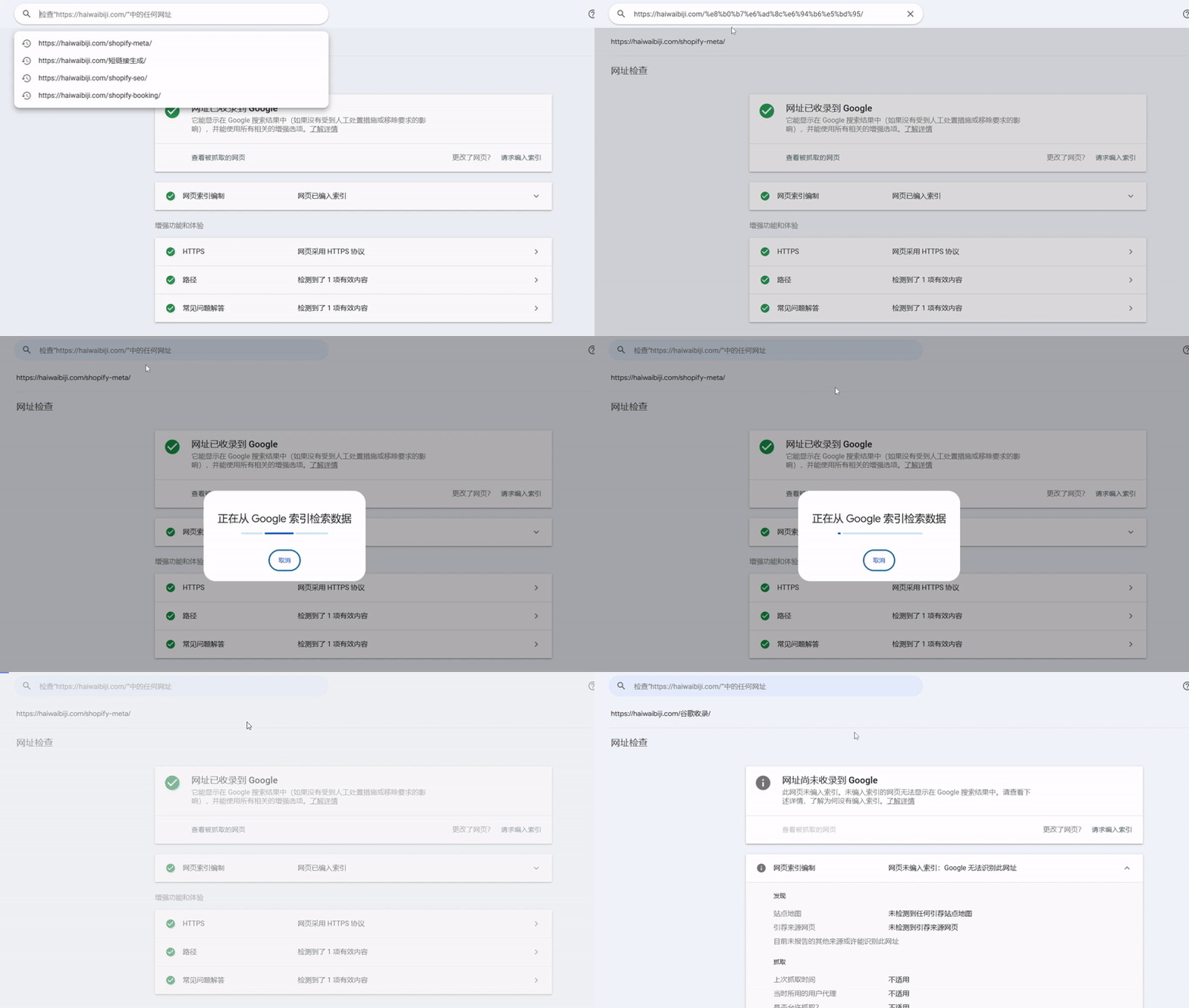
With many pages, submit a sitemap instead. Shopify hides the sitemap entry deep in newer versions (or you can grab it via an SEO app). It lives at https://yourdomain.com/sitemap.xml. Shopify auto-generates and submits it, but manual submission gets you indexed faster.
2. Optimize Shopify URL structure
Google likes simple, clear URLs — play to that:
- Make sure every product and page URL contains its main keyword.
- Avoid auto-generated clutter like collections/all?sort_by=….
- Hand-edit URL slugs in Shopify admin: shorter, closer to how people search.
Checking indexing status
These two tips are just the basic accelerators — content originality, technical SEO, image and speed optimization all help too, but they're broad, fiddly, and better treated as ongoing practice.
Nail the two tips above and you'll get indexed; Shopify really is SEO-friendly.
Indexing-to-ranking takes time though. After a while, search site:yourdomain.com in Google to count the indexed pages.
Q&A
Pages not getting indexed?
Confirm the sitemap is submitted; improve content and link structure. Check whether robots.txt or a noindex tag is blocking the page.
Pages indexed then dropped?
Check for duplicate or thin content; re-edit and resubmit.
No movement after sitemap submission?
Large sites wait longer — 1–2 weeks is normal processing time. Sensitive content (adult, violent, etc.) takes longer or never shows. Adjust accordingly.
Final words
Getting indexed is step one of Shopify SEO. From setting up Search Console to optimizing URLs, speed and content quality, a long road of routine optimization follows.
SEO is a long game — build foundations, keep publishing.
FAQ
- How do I get a Shopify store indexed by Google quickly?
- Two basics — use URL Inspection in Google Search Console and click Request Indexing for one-off pages like posts or campaign pages, and submit a sitemap (usually yourdomain.com/sitemap.xml, generated automatically by Shopify) when you have many pages.
- How do I check how many pages Google has indexed?
- Type site:yourdomain.com into Google — the results are your indexed pages. Note there is a delay between being indexed and actually showing up for keyword searches.
- What if my pages are still not indexed?
- Make sure the sitemap is submitted and the link structure is tight (no page more than three clicks from the homepage), then check whether robots.txt or a noindex tag is blocking the page.
- Is it normal that nothing changes after submitting a sitemap?
- Yes — with many pages Google typically needs one to two weeks to process. Sensitive content such as adult or violent material takes longer or may never be shown, so adjust the content accordingly before resubmitting.