
The 2026 Guide to Reaching a Human at Shopify Support: Where Did Live Chat Go?
Shopify's human support has vanished! "My TikTok ad account had a problem, Shopify Payments got suspended, I can't withdraw my funds — I desperately need a real person, but the old Live Chat button is nowhere to be found! I'm going in circles with a bot. It's maddening!"
Complaints like this echo across cross-border seller communities lately. Many Shopify merchants — especially those hit by payment or account suspensions — find human support harder and harder to reach. What happened? Are we doing it wrong, or did Shopify deliberately hide the door?
(Planning to open a Shopify store? Tutorial here ➡️ Shopify tutorial, or register directly.)
Why did human support "evaporate"?
Long-time Shopify users remember a "Live Chat" or "Contact Us" entry sitting plainly in the admin or Help Center. Now it seems gone, replaced by a Q&A bot and a mountain of documentation links. When you're frantic, that experience pours salt in the wound.
This isn't a glitch — it's a deliberate strategic overhaul of Shopify's global support system.
Why did the support system change?
Shopify has never explained it publicly, but from observation:
- Efficiency through layered filtering: Shopify fields millions of merchant inquiries daily, many of them repetitive basics ("how do I upload a product?"). The AI bot and docs filter those out, freeing human agents for the complex, urgent cases.
- Precise routing: Shopify support is specialized — Payments team, Theme team, App team. The new flow forces you to classify the problem first, then routes your ticket to the right specialists, ending the old relay of transfers.
- Cost control: human support is expensive. Automating the bulk of requests optimizes staffing and redirects resources to the core business.
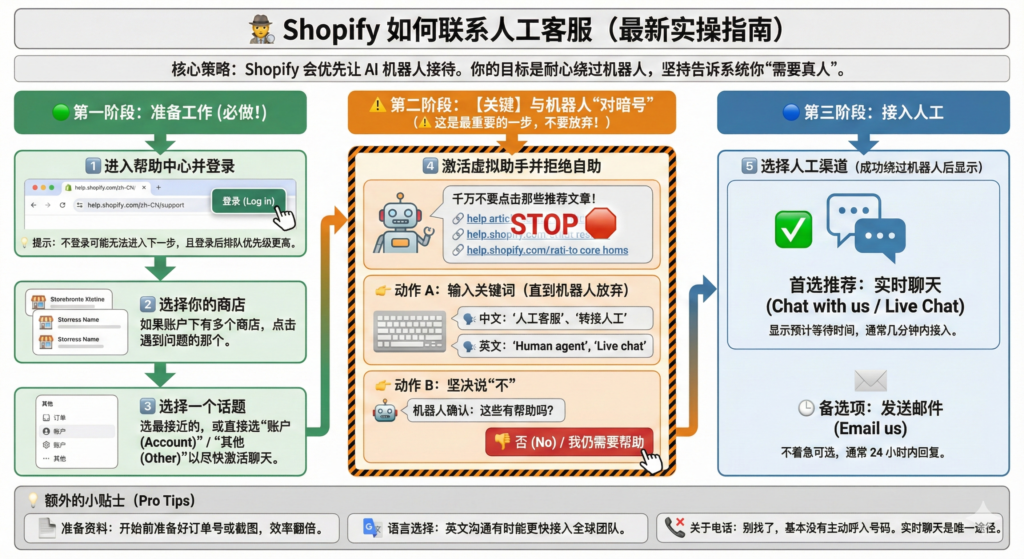
How to summon a human, precisely
Understanding the logic reveals the path. Remember: every road to a human starts at the official Help Center. Follow these steps exactly:
Step 1: Enter the Help Center and log in
Visit the Shopify Help Center, and critically: log in to your Shopify account via the top-right corner. Only then can the system identify your store and plan, and match your support tier.
Step 2: Describe your problem in the search box
Use English keywords, as precisely as possible:
- Payment issues: "Shopify Payments on hold" or "payout failed"
- Domain issues: "domain connection issue"
- Account issues: "can't login to my store"
The system recommends docs first. Skim them; if they don't solve it, continue.
Step 3: The key move — find "Get support"
After the recommended docs, scroll to the bottom of the page for the crucial button — "Get support" or "I still need help". Click it bravely. That's the real gateway to human support.
Step 4: Choose a contact channel and wait
You'll confirm the problem type once more, then see the available channels:
- Live Chat: appears when agents are online — the most efficient route.
- Email: file a detailed ticket; replies come in 24–72 hours. For non-urgent issues.
- Request a callback: available in some regions for some issue types.
Note: which options appear depends on urgency, current agent load, and your Shopify plan. At peak times, Live Chat can temporarily disappear.
4 tips for faster resolution
- Prepare the "three essentials": your store URL (your-store-name.myshopify.com), screenshots or screen recording, and relevant order numbers or customer info. This dramatically shortens the conversation.
- Language isn't a barrier: official support runs in English. Use a translator if needed — agents are used to it and will be patient.
- Stay professional and calm: even in a panic, be polite and structured. "My Shopify Payments is on hold, here is the case ID from the email" locates the problem far faster than "Why you stop my money!!!"
- Third parties for deep technical issues: for code changes, API integrations or complex app configuration, official support is limited. Shopify Experts or specialized tools are often the better route — for complex shipping rate tables or multi-market tax setups, official support may just hand you documentation to study.
FAQ
Does Shopify have Chinese phone or WeChat support?
No. Shopify's support channel is the unified English Help Center. Don't trust any third party claiming to be "Shopify China official support" — beware of scams.
I followed the steps but only see the email option, no Live Chat?
Usually: 1) few agents online at this hour (e.g. North American late night); 2) your issue was classified non-urgent and routed to email; 3) temporary system adjustments. Try different keywords or another time of day.
Can I just @Shopify on Twitter or Facebook?
For widespread outages, social media is good for information. But for individual account issues, privacy policy means the social team's only answer is "please contact us via the Help Center." There's no bypassing the flow above.
Hope this deep-dive demystifies Shopify's support logic — next emergency, you'll reach a human calmly and fix it fast!
FAQ
- Where did Shopify's Live Chat support go?
- Shopify restructured global support — an AI bot and help docs now filter basic questions, and tickets are routed to specialist teams by topic. The human channel still exists: sign in to the official Help Center, search your issue, scroll to the bottom of the page and click Get support or I still need help to reveal the live options.
- What is the fastest way to reach a real Shopify agent?
- Four steps — sign in to the Shopify Help Center, search your problem with precise English keywords (like Shopify Payments on hold or payout failed), skim the suggested docs, then click Get support at the bottom. Pick Live Chat when available, otherwise Email (replies in 24-72 hours) or Request a callback.
- Does Shopify offer phone or WeChat support in China?
- No. Shopify support runs through one global English Help Center, so treat anyone claiming to be official Shopify China support as a scam. If your English is shaky, use a translator — agents deal with that every day.
- Why do I only see the email option and no Live Chat?
- Three common reasons — few agents online in your time zone (late night in North America, for example), your issue was triaged as non-urgent and routed to email, or a temporary system change. Retry with different keywords or at another time, and have your store URL, screenshots and order numbers ready to speed things up.