
The "False Prosperity" of Anomalous Facebook Ads Data
Sound familiar? You excitedly open Facebook Ads Manager, see 10 Purchase conversions today — jackpot! Then you switch to Shopify: 5 actual orders. Half the data vanished into thin air? What is going on?!
Facebook Pixel reporting far more purchases than Shopify's real orders is a pain countless cross-border sellers share. It wrecks ROAS calculation, misleads your read of campaign performance, and misallocates budget. Why does this "false prosperity" happen? Let's dissect the causes and fix them properly.
(Planning to open a Shopify store? Tutorial here ➡️ Shopify tutorial, or register directly.)
Why does the anomaly exist?
The essential backdrop: privacy expectations keep rising.
The inconsistency isn't random — it's the joint work of several core causes. Let's take them apart.
1. User behavior: uncontrolled "Thank You page" refreshes
The most common and most overlooked cause. After purchase, the customer lands on Shopify's Thank You page — exactly where the Pixel's Purchase event fires.
Imagine:
- The customer refreshes to save the order info.
- They bookmark the page and return days later to check shipping.
- They click back in from the order confirmation email.
Every visit or refresh can fire the Pixel again, sending Facebook another "purchase". Three refreshes = two ghost orders in your dashboard. (Few users behave this way, but even leaving and returning in the same browser can re-trigger the record.)

2. Technical duplication: browser Pixel + CAPI "double reporting"
Since iOS 14.5 tightened privacy, Shopify's official Facebook & Instagram channel defaults to the "maximum" tracking standard — running both:
- Browser-side Pixel: data sent from the user's browser.
- Server-side CAPI (Conversions API): data sent from Shopify's servers to Facebook's — more stable, more interference-proof.
Facebook deduplicates the two via an event_ID parameter. But the dedupe can lag or fail in some situations, and one real purchase gets reported twice (once per channel), inflating the numbers.
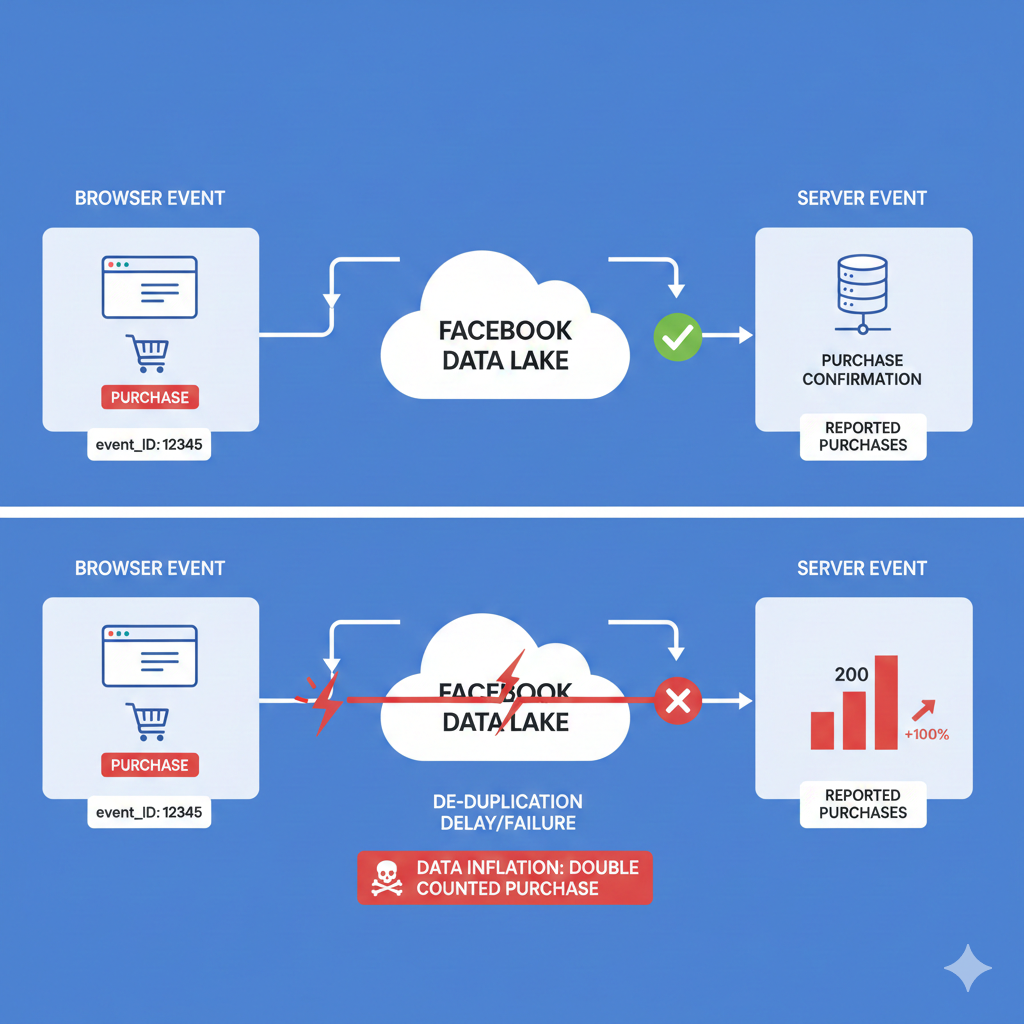
3. Attribution windows: the Facebook–Shopify "time gap"
Facebook counts conversions inside its attribution window (e.g. 7-day click). Shopify shows the order's actual creation date. Example:
A customer clicks your ad Monday but buys Friday. Facebook attributes the purchase to Monday's campaign; Shopify shows a Friday order. Compare only Friday's numbers and Facebook has an extra "phantom" purchase.
4. App conflicts: third-party "friendly fire"
Many sellers install post-purchase upsell or Thank-You-page beautifier apps. Poorly built ones can fire an extra purchase event after the original order, or disturb Shopify's tracking logic into double reporting.
The official logic and the fixes: recalibrating your data compass
Knowing the causes, treat them one by one.
1. Check the Pixel setup: one source only
The most important first step. Ensure the Pixel is installed through exactly one channel. Best practice:
- Use only the official Shopify app: set your Pixel ID in the "Facebook & Instagram" sales channel.
- Remove all manually added code: check theme files (especially
theme.liquid) for hand-pasted Pixel base or event code. Duplicate code is the #1 culprit of duplicate counting.
2. Diagnose with Facebook event IDs
In Events Manager, open the Purchase event details. Every event should carry a unique event_ID — Shopify's official integration generates and sends one per order. Many events without an event_ID, or several sharing one, mean dedupe is broken — usually old manual code or an incompatible app.
3. The ultimate weapon: an anti-refresh script (advanced)
To fully kill refresh-driven duplicates, plant a snippet ensuring purchase events fire only on the customer's FIRST arrival:
- Shopify admin -> Settings -> Checkout.
- Find "Order status page" -> "Additional scripts".
- Paste in full:
<script>
if (Shopify.checkout.first_time_accessed) {
  // paste tracking code here, e.g. the Facebook Pixel Purchase event
  // Shopify's official integration handles its own dedupe,
  // but this block is ideal for wrapping other fire-once scripts (affiliate pixels etc).
  // For FB Pixel fixes, the key is ensuring the logic runs exactly once —
  // this guard effectively prevents refresh-driven double fires.
}
</script>
Note: Shopify's modern integration already tries to handle this internally, but the script adds a layer of insurance — especially in complex store setups.
Pitfalls and best practices
- Trust Shopify's revenue numbers: for financial statements and ROAS, Shopify's sales figures are your single Source of Truth.
- Treat Facebook data as trend signal: don't agonize over each number; use it to read macro trends — which creative resonates, which audience clicks.
- Audit third-party apps regularly: whenever you install an app that touches checkout or the Thank You page, watch your Facebook data for fresh anomalies.
For sellers with demanding tracking needs or piles of complex apps, manual debugging gets slow and error-prone — dedicated pixel-tracking and attribution apps can automate the management and deliver cleaner reports.
FAQ
Does inflated purchase data mean my ad spend was wasted?
Not exactly. What's inflated is the "reported conversion count", not the "actual ad clicks". Users really clicked and visited; the final purchase event just got double-counted. Your spend bought real traffic — fixing the measurement lets you judge that traffic's true conversion efficiency.
Should I trust Shopify's data or Facebook's?
Each has its job. Trust Shopify on "how many sales happened and how much revenue". Trust Facebook on "how many impressions and clicks, and which audiences engage". Conversions need both, with Shopify as the final arbiter.
Did iOS 14 make this worse?
Yes — more complicated. iOS 14 weakened browser-side Pixel tracking, making CAPI essential. With Pixel and CAPI coexisting, imperfect dedupe amplifies the discrepancies. Using Shopify's latest official integration matters more than ever.