
The 4 Google Ad Types — Read Before You Spend

Beyond knowing where ads show, a beginner should understand how each ad type is composed and displayed.
It shapes how you play different products during delivery.
A disclaimer first: whatever the product, tactics must be validated and adjusted against real data. Some products look wrong for search ads on paper yet perform miraculously there — you can even run blog pages as landing pages.
Table of contents
1. Search Ads
1) Standard Search Ads
The most fundamental Google ad format.
When users type relevant keywords into Google, standard search ads appear on the results page to attract clicks toward the advertiser's site.
Composition
- Ad label: "Sponsored" (marking it as an ad, distinct from SEO results)
- Domain info: the advertiser's address, showing the source and adding credibility.
- Headline: up to 30 characters to catch attention and describe the offer.
- Description: up to 90 characters elaborating features and encouraging the click.
- Offer links: a few hyperlinked words showing current promotions to lift CTR.
Placement
- Typically the top, bottom or side of Google results pages.

How it works
- The advertiser creates a campaign and selects keywords — say "hotel booking".
- When users search related terms, the system matches eligible campaigns and decides display based on bid, ad quality and other factors.
- On winning, the ad appears with headline, description and display URL.
- Interested users click through to the advertiser's site — conversion achieved.
Pros and cons
Pros
- High conversion: content matches the user's search intent closely, so CTR and conversion run high.
- Precise targeting: Google's vast search data locates the users most likely to care.
- High control: placement, schedule, match types, bids — everything is adjustable.
- Massive traffic: billions of daily searches feed the pipeline.
Cons
- Fierce competition: keyword auctions push hot keywords expensive — rough on small advertisers.
- CTR decay: limited inventory pushes some ads low on the page, dragging CTR.
- High cost: keyword curation devours time — large advertisers need armies of SEM buyers, which eats the ad budget and, note, cuts into the platform's own revenue!!
2) Dynamic Search Ads
Dynamic ads on results pages, generated from the user's search and your site's content for greater precision.
Same placements as standard search, but optimization, keywords and copywriting are automated by the machine.
Composition
- Headline: auto-generated, tied to the searched keywords.
- Display path: shows the site path or related keywords to signal relevance.
- Description: advertiser-provided detail.
- Domain: the target site.
How it works
- Google automatically scans the advertiser's site, generating keywords and headlines from its content.
- When users search related terms, the system dynamically generates headline and path to match the query.
- Clicks land on the page matching the user's query.
Pros and cons
- Pros: automation covers huge keyword and content ranges with no manual campaign management, generating relevant headlines fast — better relevance and CTR.
- Cons: advertisers lose full control over generated headlines and paths, and the leaner ad text may under-inform users, hurting conversion.
2. Display Ads
1) Standard display ads
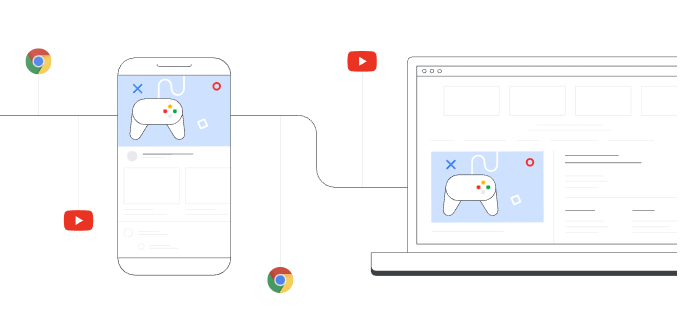
Image ads across the Google Display Network; advertisers choose which sites and apps show them.
Composition
- Headline: up to 25 characters.
- Description: up to 90 characters.
- Image: custom uploads, auto-fitted to slot size.
- Slots: banners, squares, rectangles and more.
- Common sizes:
- Banners: 468x60, 728x90, 970x90, 970x250
- Squares: 200x200, 250x250, 300x250, 336x280
- Skyscrapers: 120x600, 160x600, 300x600, 300x1050
- Rectangles: 250x360, 480x320, 640x360, 800x440
- Mobile: 320x50, 320x100, 250x250, 200x200
How it works
- Advertisers choose placements and targeting — device, geography, interests, search history. This data lives in cookies and third-party data centers.
- As users browse, the network matches ads per the targeting.
- Matched ads render in the page's ad slots.
- Clicks redirect to the advertiser's page.

Pros and cons
Pros
- Reach: the network spans countless sites and apps.
- Precise targeting: geography, interests and more, lifting conversion.
- Custom imagery: better visuals, better CTR.
Cons
- Ad blockers: some users filter ads, cutting impressions and clicks.
- Weaker visuals than video/dynamic formats.
- Demanding creative: testing assets costs real money — versus text ads, image ads consume far more human resources, and asset appeal largely decides click and conversion outcomes.
- Uneven results: with blockers plus variable partner-site quality, some categories underperform. Apparel currently does relatively well on GDN. Placement decides most of display's performance — and the good placements concentrate in Google's own product family.
2) Dynamic Display Ads
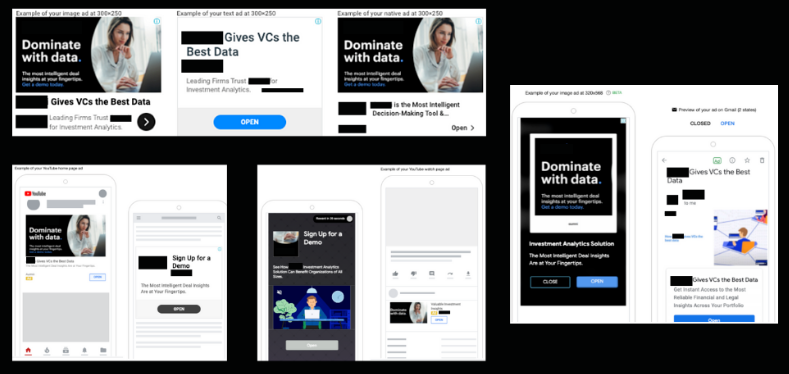
Responsive ads that auto-adjust size and format per slot — rendering images, animation, HTML5 and video across the network.
Composition
- Image or video assets
- Headline
- Ad text
- Company logo or product icon
How it works
- The advertiser supplies assets, headline, text and logo.
- The system dynamically composes the ad in the best format and size per slot.
- Targeting settings route the ad to matching audiences.
Pros and cons
Pros:
- Responsive formats fit every slot — no design production needed.
- Audience targeting by behavior and interest lifts conversion.
- Multiple formats — image, animation, HTML5, video — grab attention.
- The system self-optimizes on results, improving conversion and ROI.
Cons:
- The site must supply rich assets and text, or results suffer.
- Some technical and design capability is required.
- Results can hinge on asset quality and content.
Audience signals
Since creative is automated, a high-quality audience becomes everything.
What's an audience signal? In the "people-product-place" trinity, it's the people — whoever you sell to is your audience.
Three broad kinds: interest audiences, remarketing audiences, and lookalikes.
The comparison:
- Interest audiences: grouped by browsing/search history and Google partner data.
- Behavioral audiences: grouped by on-site behavior (visiting pages, clicking buttons) and conversion history.
- Lookalikes: prospects resembling your existing customers, per Google's behavioral analysis.
- Location audiences: targeted by country, state, city or postcode.
- Custom audiences: targeted from your uploaded data (emails, phone numbers).
- YouTube audiences: grouped by what, how often and how users watch on YouTube.
The working principles and strengths:
| Audience type | How it works | Strength |
| Interest | Browsing/search history plus partner-site data. | Reaches people interested in your product. |
| Behavioral | On-site behavior and conversion history. | Reaches people already showing relevant behavior. |
| Lookalike | Prospects resembling existing customers. | Reaches customers-like prospects, lifting conversion. |
| Location | Geographic targeting. | Reaches prospects inside your target market. |
| Custom | Your uploaded data. | Reaches prospects you already know and have contacted. |
| YouTube | Watch patterns and interactions. | Reaches the YouTube crowd relevant to your product. |
The takeaway: behavioral audiences tied to your own site perform best — these are the remarketing audiences, the highest-ROI segment.
Small sites have limited traffic budgets, so display's share stays small there; it's common at sites with real volume (100–500K+).
3. Video Ads
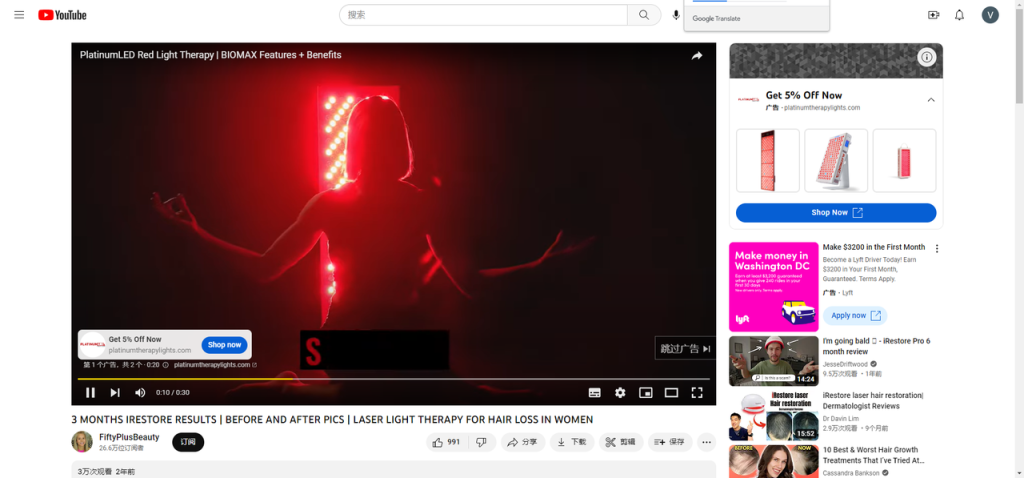
Ads inside YouTube and other video content — overlays, pre-rolls, mid-rolls.
Composition
- Video asset: brand story, product intro, campaign.
- Ad text: the call to action — visit, buy.
- Thumbnail: the cover that draws the eye.
- Logo: the brand mark for recognition.
How it works
- Advertisers choose YouTube placements, budget and duration.
- Users see ads before or during videos.
- Billing is typically CPV (cost per view) or CPM.
- Reports enable monitoring and optimization.
Pros and cons
Pros
- Vast reach: YouTube is among the largest video sites on earth, with billions of daily views.
- Audience selection by gender, age, geography and more improves conversion.
- Vivid, engaging format conveys brand and product intuitively — awareness and conversion both benefit.
Cons
- Production costs more — shooting, editing — than other formats.
- Production takes time; no same-day launches like text or image ads.
- Some users skip, reducing exposure.
4. Shopping Ads
1) PLA — Product Listing Ads
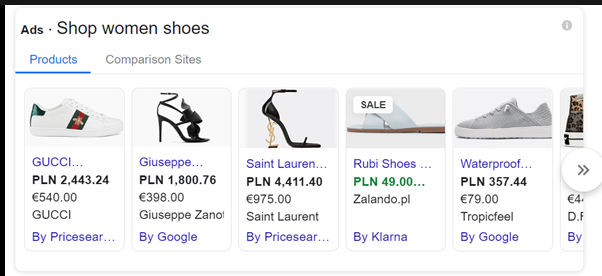
PLA — also called Google Shopping ads.
They appear on results pages as image + product info, linking straight to the product page.
Unlike standard search, PLA placement and rank derive from the advertiser's product data and bids — not keywords and bids.
Composition
Product title: the name and key info, attracting the click.
Price: shown up front so users know the level.
Merchant name: the selling store, adding trust.
How it works
- Merchants upload product data and images to Google Merchant Center, building the catalog.
- Campaigns and groups are created in Google Ads with placement, schedule and budget.
- Relevant product searches trigger listings on results and Shopping pages.
- Clicks land on the merchant's product page.
Pros and cons
Pros
- Versus text ads, listings show image and price — more attractive, more useful.
- Placement usually tops the results page: higher exposure, higher CTR.
- Bids and competition run lower than search; optimizing feed data yields outsized returns on small spend.
Cons
- Only fits e-commerce products.
- Results hinge on image and data quality — continuous optimization required.
- The industry calls PLA "price-comparison ads": within one keyword, ranking leans heavily on price. Other service data matters, but for the same audience and same product, the cheapest one shows first.
2) SSC — Smart Shopping Campaigns
SSC is an AI-optimized shopping format that auto-creates and optimizes campaigns for better display and conversion.
Merchants upload catalog data to Merchant Center, and Google surfaces the products across Search, Shopping, Image Search and more.
It fuses PLA characteristics with dynamic display characteristics for heavy automation.
(Note: SSC's entry point has disappeared — replaced by PMax. Think of PMax as SSC's venti version.)
Composition
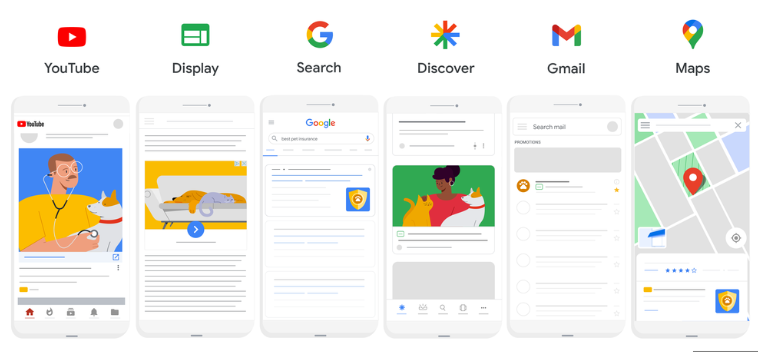
- Display ads: across Search, YouTube, Gmail and the Display Network.
- Listings: image + price on Search and Shopping results.
- Store-visit ads: your physical location advertised in Google Maps.
How it works
SSC optimizes delivery with machine learning:
- Choose products and budget.
- Google picks placements, timing and bids per campaign.
- You provide copy, images and taglines; Google optimizes delivery against your goals and user behavior.
- Google tests and tunes automatically for display and conversion.
- You monitor performance data and adjust.
Pros and cons
Pros
- Automation: ML creates and manages campaigns, saving time.
- Precision: behavioral targeting lifts conversion.
- Measurability: performance data makes monitoring easy.
- Integrated optimization across display, listings and store visits.
Cons
- Relative complexity: setup and management need skill.
- Data dependence: results follow the quality of your data and goals.
- Automation removes direct control over placements.
3) PMax — Performance Max
Performance Max launched in 2021 — an automated solution built on machine learning.
It collects your goals, assets and data, then auto-optimizes display for conversion and ROI.
Signature traits:
- Adaptive ads: auto-fitting the best format per slot across search, display, video, Discover and more.
- Machine learning: recognizing audience needs and optimizing delivery automatically.
- Unified delivery: simultaneously across Search, YouTube, Google Play, Maps — total coverage.
- Data-driven: continuous analysis and optimization toward higher conversion.
Composition
Multiple ad types — responsive display, responsive search, dynamic ads — with text, image and video assets optimized per platform.
How it works
Built on Google's ML and AI: your assets and data upload to the platform, which analyzes data quality, asset quality and user behavior to optimize display and conversion.
Pros and cons
Pros
Deep automation — the system optimizes itself, cutting your workload — with the broadest platform and format coverage.
Cons
- Because PMax spans Display + Search + Shopping, it crowds out your other campaigns' performance.
- Google won't reveal specific placements, leaving little to optimize — you can't target the network you want.
- It solves efficiency (one campaign, all placements) but not ROI: new sites without data history can't even tell where the money went, let alone optimize. Shopping can reach ROI 3; PMax sitting at 2.5 is the norm.
5. Other ads
App Ads
Ads in Google Play promoting app installs and usage.
By difficulty in e-commerce: if marketplaces are a 1, independent stores are 10, and apps are 100 — maybe 1,000.
Tangled attribution and endless unsolved problems mean only head sellers succeed on apps: Shein, Anker, Cider, Banggood.
I've run them; the ROI was hostile (1.5 counts as a blessing) and acquisition costs are extreme. Without a mature internal user-operations team, LTV can't cover it — and without LTV, one-shot selling cannot support app acquisition plus maintenance.
Given most sellers live on new customers — brand-led sellers with true private domains are rare — I'll leave it there.
6. Type comparison
| Ad type | Traits | Placements | Pros/cons | Achievable goals |
| Standard search | Text ads triggered by queries | Top/bottom of results | Precise, keyword bidding, high conversion | Awareness, traffic, sales |
| Dynamic search | Ads generated from site content | Top/bottom of results | Auto-created, varied display | Traffic and sales, saved production time |
| Standard display | Image/video ads | Network slots | Varied formats, wide reach | Awareness, traffic, sales |
| Dynamic display | Ads generated from content + behavior | Network slots | Auto-created, varied display | Traffic and sales, saved production time |
| Video | Pre/mid/post-roll ads | YouTube and Google video sites | Sight and sound, conveys complexity | Awareness, traffic, sales |
| Shopping | Image + price + merchant | Results pages and shopping surfaces | Precise, product-forward | Sales and conversion |
| Performance Max | Cross-platform, multi-format | Search, YouTube, Gmail, Display and more | Optimized delivery, better conversion/ROI | Any goal: awareness, traffic, sales |
The comparison shows how fast advertising evolves with the technology:
In the auction-ranking era, search ads dominated — everyone worked "keywords".
In the RTB era, display dominated — creative unleashed categories language can't precisely describe, like apparel; that's the era that birthed Shein.
Shopping ads then gave independent stores and cross-border sellers their best showcase.
Now, in the AI era, PMax is the mainstream Google campaign — and its resistance to optimization, plus unspectacular ROI, is the ache in every Google media buyer's heart.
FAQ
- What are the main types of Google ads?
- Four major families — Search ads (standard and dynamic), Display ads (standard and dynamic), Video ads on YouTube and partner sites, and Shopping ads (PLA, Smart Shopping and Pmax), plus App ads as a separate category.
- Which Google ad type fits which goal?
- Search ads are precise with high conversion, ideal for traffic and sales; Display ads offer varied formats and huge reach for brand exposure and visual products; Video ads excel at conveying complex messages; Shopping ads show the product image and price directly and are conversion-driven; Pmax auto-optimizes across every Google surface and can serve any goal.
- What is the dominant Google ad format now?
- In the AI era Pmax has become the mainstream campaign type, though being hard to optimize with unspectacular ROI makes it every media buyer's headache. Historically, Search ruled the bidding era, Display exploded in the RTB era (making apparel players like Shein), and Shopping gave independent stores their best showcase.
- Are Google App ads worth running?
- The bar is extremely high — if Amazon difficulty is 1, an independent store is 10 and an app is 100 or even 1000. Attribution is tangled and acquisition brutally expensive (the author counts an ROI of 1.5 as lucky); without a mature user-operations system to sustain LTV, the costs never close. Only top sellers like Shein, Anker and Cider make it work.