
Google Ads for Shopify (2026): Setup to Conversion Tracking
Google Ads for Shopify can capture search demand, present products and reach channels such as YouTube, but it is not mandatory for every store and does not guarantee profit. This 2026 revision covers accounts, campaign types, the Google & YouTube app, conversion measurement, launch checks and stop-loss decisions.
What is Google Ads?
Google Ads is the current name; Google AdWords is historical. Search is one product alongside Shopping, Performance Max, Demand Gen, Video, Display and App campaigns.
For traditional B2B that's accurate. Before Shopping ads rose, "Google advertising" meant keyword selection and bidding. For B2C, though, with product counts so large, researching keywords per product or per line was unwieldy and labor-hungry.
Shopping Ads existed before 2019; automated bidding, product feeds and cross-channel campaigns then continued to evolve. Automation reduces some manual work but does not remove product, creative or measurement responsibilities.
Google Ads can serve across Search, Shopping, YouTube, Discover, Gmail, Maps and the Display Network depending on campaign type. Performance Max uses automation to find opportunities across channels, but depends on accurate feeds, conversion values, creative, budget and business goals. It does not guarantee high ROI or replace operator judgment.
And Shopify has wired Google directly into its ecosystem, slashing the workload for store operators.
How does Google Ads work?
Google runs many formats; let's use the common search ad to illustrate. In the flow of information, users hunting for a product within the noise search for target keywords. Want an iPhone? You search "iPhone" on Google, Baidu or Bing. As a clever merchant you realize users search that keyword — and Google realizes there's money in it. So Google builds the bridge.
The problem: many merchants, one keyword, one screen of results. How do users get the best experience while merchants do too?
Auctions — Yahoo's idea, carried to glory by Google.
Merchants craft creative highly relevant to "iPhone" — landing pages, keywords, images, copy — which Google scores for relevance, ensuring a click on "iPhone" doesn't land on "Pineapple Phone".
Meanwhile, merchants bid on the keyword.
Eligibility and position use Ad Rank, including bid, ad and landing-page quality, thresholds, competition, search context and the expected impact of assets—not a two-factor relevance-plus-bid formula.
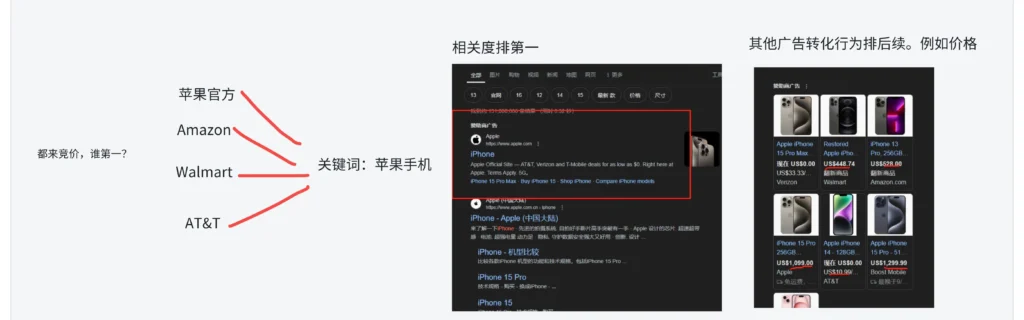
How Google Ads works
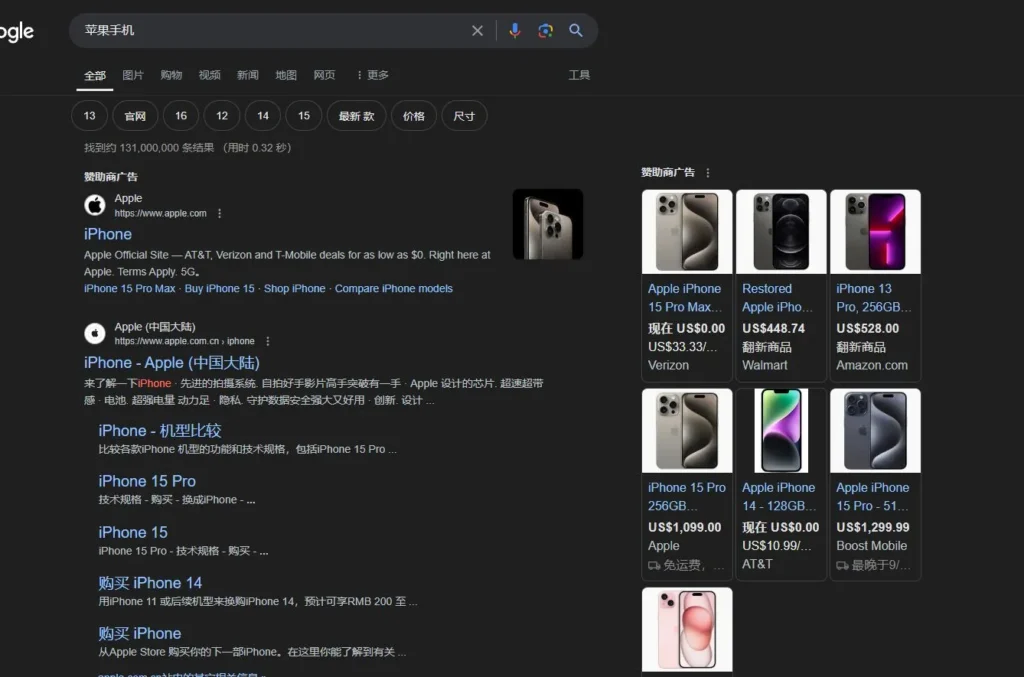
Google placements
Hence the steps every tutorial mentions:
Keyword research.
Human brains can't guess every keyword, so keyword-mining tools exist to surface what users actually search.
Ad creation.
Copy that attracts clicks; landing pages laid out to convert.
Bidding and display.
How much wins impressions and traffic? Where does it show, and how does it perform?
Optimizing on results.
Core metrics include impressions, clicks, cost, conversions and conversion value. A Shopify operator must also reconcile platform reporting with orders, refunds, margin and new-versus-returning customer definitions. Platform ROAS is not profit.
What Google Ads brings to Shopify
Google Ads also works with other compliant sites. Its value is access to Google-owned channels and partner inventory across both active search demand and broader discovery. Actual reach and results depend on country, consent, product policy, auctions and creative.
Mature product, variable results
Google advertising has a long product history and the interface includes automation and diagnostics. Structure, product policy, attribution and profit definitions still require judgment. Completing a learning period does not guarantee stable monthly ROI; seasonality, competition, inventory, tracking, site changes and demand can all move performance.
Mature ecosystem, fast onboarding
Coming from self-built sites to Shopify, the contrast is stark. Self-built means embedding code yourself, defining events yourself, no official support, English documentation only — genuinely painful.
Merchants can open an account directly or choose a verified partner. Shopify's Google & YouTube app can help sync products and connect some measurement, but installation does not prove Merchant Center approval, consent mode, enhanced conversions, order values and refund reconciliation are all correct.
Rapid project validation
After the Shopify launch checks, ads can bring controlled traffic relatively quickly to test intent, offer and checkout. A small budget, long decision cycle or measurement error can still make the result inconclusive. SEO, social and email serve different stages and should not be excluded simply because they develop more slowly.
Google ad types
Google's ecosystem offers many ad products for different merchants. Since this guide targets Shopify cross-border sellers, here are the 3 common types — for depth, see The 4 Google Ad Types.
Search ads
As the name says: users search a keyword, you bid on it for traffic. Crucial in Google's ecosystem — people willing to spend effort typing a query carry high intent and convert visibly better.
Display ads
Image ads and video ads. Sites plastered with ads across Google's partner network — that's the Display Network; the mid-roll ads you see on YouTube without Premium — those are video ads.
Shopping ads
Two kinds: listings under Google's Shopping tab triggered by keyword searches, and PMax — the newer type blending the Shopping channel with most Google surface area, converting through varied product presentations.
Summary: all three have merchants who've mastered them and made serious money. As a beginner, weight your budget toward Search and Shopping — purchase intent is clearer there, and they test product-market fit faster.
Common Google Ads terminology
A quick literacy pass; the rest lives in Google's help docs.
Impression — times your ad was seen.
Click — times your ad was clicked.
Conversion — the desired post-click action: purchase, form fill, etc.
Cost — actual ad spend.
Intermediate:
CPC (Cost Per Click) — what one click costs.
CPM (Cost Per Thousand Impressions) — what a thousand impressions cost.
CTR (Click-Through Rate) — clicks ÷ impressions; how compelling the ad is.
CPA (Cost Per Acquisition/Action) — what one conversion costs.
ROAS (Return on Ad Spend) — revenue ÷ ad cost.
Others exist — look them up as needed; these five basically suffice.
Creative-related:
Landing Page — the optimized page users reach after clicking.
Keywords — the words and phrases that trigger your ads.
Broad Match — can cover a wider set of queries related to the keyword's meaning, using account and landing-page signals.
Phrase Match — can cover queries that include the keyword's meaning, generally wider than exact and narrower than broad.
Exact Match — covers queries with the same meaning or intent, not only identical characters.
Negative Keywords — exclusions preventing irrelevant impressions.
Ad Assets — formerly extensions, such as sitelinks, calls and images that may appear with an ad.
Quality Score — Google's rating of relevance, expected CTR and experience; higher is better.
Ad Rank — determines eligibility and relative position using bid, auction-time quality, thresholds, competition, search context and assets.
Structure-related:
Campaign — a set of ad groups oriented to one goal: branding, sales.
Ad Group — a grouping of related ads and keywords for manageable optimization.
Ad — the unit containing copy, images, links, extensions, contact info.
Bidding-related: Bid Strategy — how you bid: manual, target CPC, target ROAS…
Target CPA — set your desired conversion cost; Google auto-adjusts bids toward it.
Target ROAS — set your desired return ratio; Google auto-adjusts bids toward it.
Enhanced CPC (ECPC) — a historical strategy no longer available for Search and Display campaigns since late March 2025; old campaigns effectively use Manual CPC.
Smart Bidding — Google's ML-driven auto-bidding maximizing conversions or value. These are entry-level, but dense — revisit them alongside Google's help center to understand the technology and algorithm behind each.
Why bother? Master Google's system and learning other platforms — Facebook, TikTok — becomes far easier.
How to run Google Ads on Shopify
Any independent store needs 4 steps:
-
Open an ad account and fund it;
-
Insert Google's ad code into the site;
-
Verify the code;
-
Launch.
On Shopify, each step has shortcuts.
Open an account and fund it
Use an account whose entity, payment profile and website are accurate. Never buy an account or open a new one to evade suspension. A merchant can open directly or select a provider verifiable in the Google Partners directory. Compare contracting party, funding and refunds, account ownership, administrator access, data export and termination terms; this article does not endorse a historical agency list.
Insert the ad code
Implementations can use the Google tag and conversion events, import from GA4, or use Google Tag Manager. Ecommerce Purchase should include unique order ID, value and currency without duplication across implementations. The Google & YouTube app simplifies connection, but primary goals, consent and real orders still need verification. Use a Google account with two-step verification and least-privilege access.
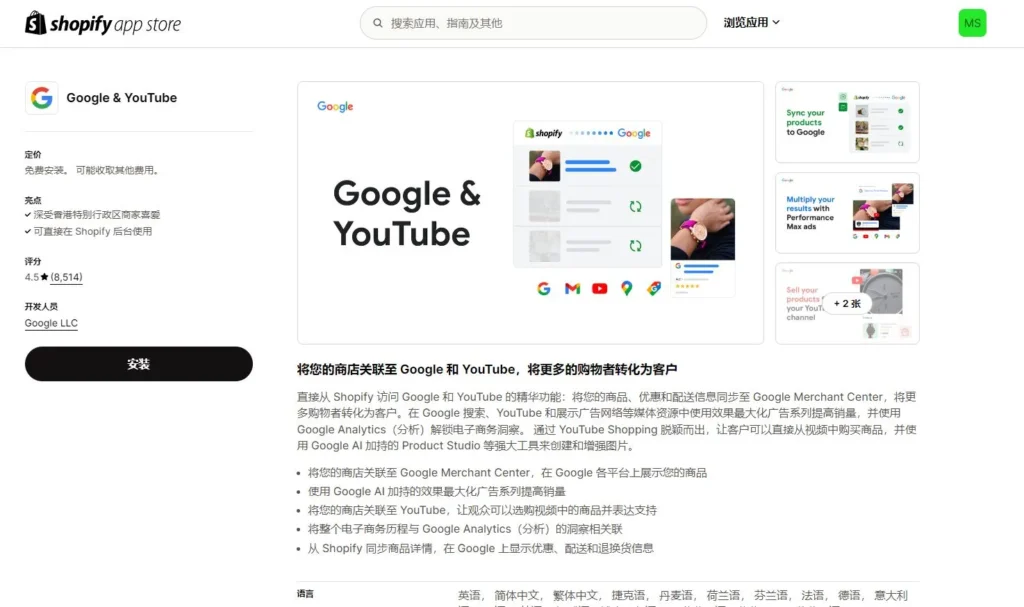
Google & YouTube Shopify App
Verify the code
Check status under Goals > Conversions > Summary. For Unverified, Inactive or Needs attention, open Tag Assistant from the conversion and complete a test purchase or form.
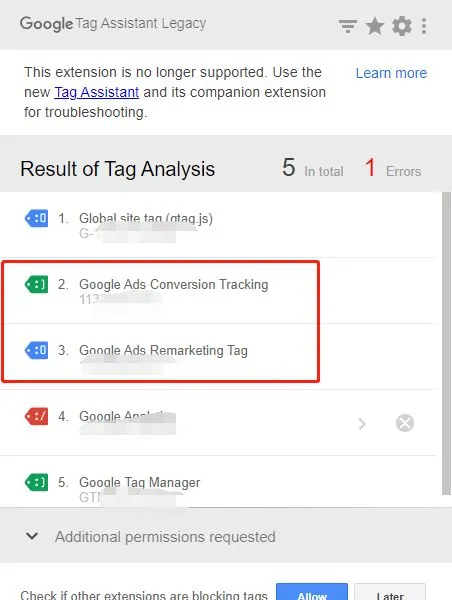
Google Tag Assistant
A fired tag only proves that a request was sent. Verify order ID, value, currency, duplication, consent status and reporting delay, then reconcile a test order before making Purchase the primary optimization goal.
Launching
Google's console updates fast and each ad type configures differently, so no screenshots here — for detailed steps see the display campaign walkthrough.
The skeleton:
-
Prepare copy, URLs, images, video.
-
Build the campaign structure, naming conventions and tracking to match the goal.
-
Set up tracking and stop-loss thresholds.
Review critical settings in Google Ads. Third-party tools are viable when account ownership, change history, data export and revocation are clear.
Basic tips and strategy
Once you're spending on Shopify — congratulations, that's step one, however big or small. Whether the step landed right requires judgment.
First: launching doesn't guarantee orders. From 0 to 1, the priority is proving the pipeline — validating the project and the product.
Many assume ads mean orders, lack any process control after launch, can't locate what broke, and simply bleed cash. That's insufficient understanding of advertising.
Orders are the end goal; decompose the journey into metrics and work toward it.
First: did the ads even serve?
Early on you'll hit ads that won't serve — while some poor soul sits waiting for orders from ads that never ran.
Typical causes, three classics:
A. You didn't fund the account.
B. Keywords too long-tail or obscure — nobody searches them.
C. Bids too low to win the auction.
Also check ad or product review, policy status, country and schedule, search demand, budget, bidding, conversion goals and billing. New campaigns may need data, but zero impressions should not automatically be blamed on a 1–2 day algorithm warm-up.
Optimize the site pages
Don't rush to optimize ads — inspect on-site data first. In Shopify analytics, check traffic sources: which pages users land on (product page or home), dwell time, add-to-carts, favorites, checkout rate, page depth — all against normal ranges.
There is no universal 30-second dwell or 70% bounce benchmark. Segment by query, device, country and landing page, then combine speed, add-to-cart, checkout, orders and user testing. High bounce can reflect intent mismatch or measurement definitions, not only page design.
Set a stop-loss
A stop-loss should come from unit economics before launch, not from deciding after an arbitrary $100 or $500 has been spent. Subtract product, payment, fulfillment, returns and variable operating costs from price to estimate contribution margin available for acquisition. Then use the required profit and evidenced repeat value to set acceptable CPA, a test cap for each hypothesis and a total account loss limit.
When a limit is reached, locate the break at impression, click, landing page, cart, checkout or payment before choosing whether to pause, repair the page, change search terms or creative, or redesign the offer. Do not keep spending beyond cash-flow tolerance merely to feed an algorithm, and do not treat one early order as validation of the model.
Record data, track iterations
With the steps above clear, you understand: every optimization exists to make the click-to-site journey comfortable, lowering conversion cost.
The adjustable surface is huge: layout, image sizes, load speed, detail-page content, copy, trust badges, payment icons, site services, offers, pricing, discounts, popups, creative, geo, age, audience…
Record each change's hypothesis, date, scope and expected metric. The observation window must cover conversion lag and enough volume, not a mechanical 3–7 days.
Then you know what works and what doesn't.
Exhausting? Trust me, it's the fastest way. If you're in this long-term, this test data threads through your whole career — next project, you'll know with far more confidence what actually matters.
How to optimize display, shopping and PMax
How long until the first order?
There is no guaranteed time to first order. Search demand, price, competition, brand trust, delivery, payment options and buying cycle all affect it. When sales are the business objective, use a verified purchase as the primary conversion; carts and checkouts are diagnostic signals, not substitutes for orders. High-ticket products may also require consultation, financing, quotations or cross-device journeys. Decide whether to continue from actual search terms, conversion lag and contribution margin.
Why isn't my ad showing?
For zero impressions, check billing, review and policy, country and schedule, keyword status and demand, negatives, budget, bidding and goals in that order. Do not replace diagnosis with a “low budget, high bid” jolt. If the cause remains unclear, preserve status and change history for official support or a compliant provider with minimum access.
My account got suspended — what now?
Read the policy reason in the account notice, correct billing, entity, product, claims, website or circumventing-systems issues, then appeal through the official process with evidence. Do not create or buy another account to bypass suspension; an agency relationship does not reduce policy risk.
Which ad type is best?
Products differ wildly, and "best" mostly means more sales or higher ROI. Standardized products tend to shine in Search and Shopping; non-standardized goods like apparel are harder to place on Google. As always: let testing decide.
FAQ
- What is the basic workflow for running Google Ads on Shopify?
- Define the business goal, prepare compliant creative and landing pages, configure campaigns/products/conversions, reconcile a test order for value, currency and duplication, then set budget and stop-loss rules. Review critical settings in Google Ads; verify ownership, change logs and revocation for third-party tools.
- Why are my Google ads not showing or spending?
- Check billing, ad or product review, policy status, countries and schedule, search demand, budget, bidding and conversion goals. New campaigns may need time to gather data, but do not automatically blame zero impressions on the algorithm or force delivery with a high bid.
- How long until Google Ads bring the first Shopify order?
- There is no universal time or spend threshold. Verify measurement and checkout, then segment query, device, country and page while checking carts, checkout, orders and contribution profit. Dwell and bounce have no fixed pass mark. Define evidence, maximum budget and stop conditions before launch.
- What if my Google Ads account gets suspended?
- Read the stated policy reason, correct billing, entity, product, claim, website or circumventing-systems issues, then appeal through the official process with evidence. Do not buy or open another account to bypass suspension; an agency relationship does not reduce policy risk.
- Which Google ad type performs best?
- It depends heavily on the product — most commodity items do best in Search and Shopping ads, while non-standard goods like apparel are harder to place. Testing decides, always.